 |
 |
This page describes content of the BARfly
Gold build. |
|
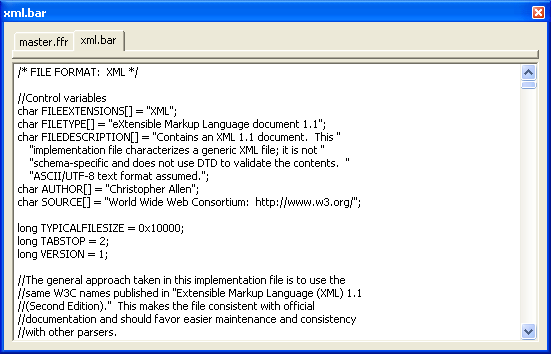 The example to the left shows what the
text of an implementation file looks like. The example to the left shows what the
text of an implementation file looks like.
In terms of the editing interface, nothing is different here from text view,
dump view, or other views in BARfly that contain edit controls. You can
type, copy, cut, and paste text. You can also find and replace data in
this view.
Implementation files are composed of the following components: control
flags, control variables, global variables, construct definitions, function
definitions, and enumerated constant definitions.
Control flags and control variables
The first part of an I.F. is generally composed of identifying information and
release notes. Much of the identifying information is in the form of control
flags and control variables.
Control flags are C-style preprocessor directives, which use "#define"
to identify a flag value that impacts the course of compilation. The
following control flags are supported:
-
INTERPRETPATCHES: True (or 1) means file can be
patched; false (or 0) means patches should explicitly not occur.
-
BIGENDIAN:
True (or 1) means all numbers have the “bigendian” type modifier by default;
false (or 0) means all numbers have the “littleendian” type modifier by
default.
-
_DEBUG: True (or 1) means the implementation file is
a debugging version; false (or 0) means the implementation file is a release
version.
-
ALLTWOBYTECHAR: True (or 1) means all text blocks
shall have the “short” simple type unit by default.
-
ALLFOURBYTECHAR: True (or 1) means all text blocks shall
have the “long” simple type unit by default.
Control variables are C-style global variable
definitions. The initial values of these variables identify file
extensions, file descriptions, and other
information. Some control variables directly impact how BAR conducts
deserialization and serialization. The following control variables are
supported:
-
TYPICALFILESIZE: Long integer. Typical file
size, in bytes.
-
MAXFILEREADSIZE: Long integer. Maximum
deserializable (read) file size, in bytes. If this value is smaller than
the BAR_Services "Max File Read Size" setting, the
control variable takes precedence as an alternative minimum. If the
value is zero, there is no read size limit.
-
MAXFILEWRITESIZE: Long integer. Maximum
serializable (write) file size, in bytes. If this value is smaller than
the BAR_Services "Max File Write Size" setting, the
control variable takes precedence as an alternative minimum. If the value
is zero, there is no write size limit.
-
MAXSERIALIZEOUTPUT: Long integer. Maximum
allowable "Serialize" method allocation size. If this value is smaller
than the BAR_Services "Max Serialize Output" setting, the
control variable takes precedence as an alternative minimum. If the value
is zero, there is no "Serialize" output limit.
-
MAXDESERIALIZEOUTPUT: Long integer. Maximum
allowable "Deserialize" method allocation size. If this value is smaller
than the BAR_Services "Max Deserialize Output"
setting, the control variable takes precedence as an alternative
minimum. If the value is zero, there is no "Deserialize" output limit.
-
MAXNODES: Long integer. Maximum allowable
number of nodes that can be generated during deserialization. If the
value is zero, nodes used during deserialization can reach as high as the
number of available node handles to the BAR_Services instance.
-
TABSTOP: Long integer. Number of spaces to include
in a tab stop. This variable can be used in many different ways; BARfly
employs TABSTOP when formatting dumped data.
-
FILEEXTENSIONS: Array of characters (null-terminated
string). File extension(s) string associated with file format. If
an I.F. supports multiple extensions, these extensions are separated by
semicolons. BARfly employs FILEEXTENSIONS as wildcard search
strings when searching for disk files by extension.
-
FILETYPE: Array of characters (null-terminated
string). File type string; a short description. BARfly employs
FILETYPE when listing file types in the common open dialog box.
-
FILEDESCRIPTION: Array of characters
(null-terminated string). File type string; a long description.
BARfly employs FILEDESCRIPTION when displaying I.F. information.
-
AUTHOR: Array of characters (null-terminated
string). String describing the copyright owner (usually the author) of
the implementation file.
-
SOURCE: Array of characters (null-terminated
string). String detailing the source of the information composing the
file format. This is not the same as the AUTHOR, who actually constructed
the I.F. The SOURCE is intended to act as a "bibliography"
field.
-
VERSION: Long integer. Version number of the I.F.
build. Generally, this starts at one and moves up with each revision, but
the I.F. designer can use this field in any desired fashion.
Global variables
Although not required, an I.F. can contain global variables to aid in the
deserialization and serialization processes. Some global variables are
used to specify control variables, of course, but any number of additional
global variables can also exist in the I.F.
Global variables have the following uses:
-
Control variables: See above.
-
Supplemental identification information: An I.F. can
contain custom information about itself, such as documentation, that the user
can retrieve and view.
-
Calculation data: Tables used to support
deserialization or serialization, such as fast CRC calculations, IDCT
translations, basic number-to-string type look-ups, etc.
-
Custom error codes and messages: An I.F. can
implement its own custom error-reporting system. Integers and strings can
be stored in global variables for quick retrieval.
-
Transitionary state variables: A means of temporarily
storing values first recognized during one critical step of deserialization or
serialization, but only actually used during future critical steps.
Global variables are only "global" to the scope of a BAR object instance.
If multiple BAR object instances are created using the same I.F., each instance
maintains its own copies of the global variables defined within the BAR object
instance.
An application can access global variables from a BAR object instance even if no
data file has been loaded with the BAR object instance. As long as a
valid BAR object instance exists, its global variables exist.
Click here for information about global variable
definition syntax.
Construct definitions
Construct types were described in the section on node
editing. Construct definitionsin an I.F. are
very straightforward; they strongly resemble their displayed characteristics in
the node browser, UTD dump view, and construct
hierarchy diagrams.
Structure definitions in BAR are almost ubiquitous with their
C-based language counterparts. Block and list definitions
are specific to BAR and have their own unique syntax.
Declarations can be nested. This is advantageous
because constructs can be declared synonymously with the visual rendition
in the construct hierarchy diagram.
Click here for information about construct definition
syntax.
Function definitions
Global functions and Member functions are
declared and written in BAR in much the same fashion as their C-based language
counterparts. A function is global if it is declared at file scope;
a function is a "method" or member function if it is declared within the
body of a structure or block definition.
There is no limit to the type and variety of functions you can write in a BAR
implementation file. However, the most important functions are those that
compose the critical steps of the deserialization procedure
and serialization procedure.
Click here for information about function
definition syntax.
Click here for information about critical step
implementation.
Enumerated constant definitions
To aid in compilation and in type lookups, blocks of enumerated constants
can be defined within the implementation file. These have the same syntax
as their C-based language counterparts, except that all enumerated constants
are global--they cannot be isolated to a specific member scope.
BARfly heavily draws upon enumerated constants declared within an I.F. The
more enumerated types are declared and used in an I.F., the easier a person can
read and understand data file content.
Click here for information about enumerated constant
definition syntax.
See also: [Three forms: text, binary,
mixed] [The compilation process] [BAR
implementation file reference]
|
