|
|
||||||
|
|
||||||
 BAR I.F.s in three forms: text, binary, mixed
 |
||||||
|
BAR implementation files contain code and data definitions, just like other types of programming code. However, an I.F. is much more geared towards representation of data than in executing general-purpose code. All functions that do appear ultimately have the goal of assisting in the data representation and conversion process. There are three forms of implementation files: text, binary,
and mixed text and binary. For text and mixed formats,
only the text portion is shown in the data display window. For binary
format, a message identifying that only an unreadable binary portion
exists is displayed in the window instead. Text-only form All implementation files start out in text-only form. By selecting File.New BAR Implementation File, you can get an idea of how to begin work on one. You type text to enter control variables, other global variables, global functions, constructs, and member functions. When you save this file, it is saved in plain-text format like any other text file. The I.F. cannot actually be "used" in its functional sense until it is compiled. Press F7 to compile the I.F. or select Run.Compile from the menu. Binary-only form The binary-only form is a compiled version of an implementation file that does not contain the original text source. This form of I.F. can be "used" for intended functionality in BARfly and in all other implementations of the BAR engine. However, because no source code exists, the only ways to effectively "read" about the capabilities of the I.F. are to invoke Information.Show File Info or Information.Show Constructs. There are advantages and disadvantages to binary-only form. It is usually a good idea to keep a record of the original source for development purposes. If you are distributing a BAR-capable end-user application, though, you probably do not want your source code to be sent to end-users, which justifies a binary-only I.F. Mixed form The mixed-text-and-binary form is an I.F. that has been compiled, but its original source code is tacked on to the end of the binary portion. It is very easy to keep track of implementation files this way, because you don't have to worry about separate source and output files during development: you have only one file. Any time you want to edit the text portion of the I.F. and recompile it, you can do so at any time. When you save this file, it is saved with the first part of the file acting as the binary portion (the compiled portion), and the last part of the file acting as the text portion (the source portion). If you are unable to compile the latest mods to the text portion of a mixed I.F., you can still use the last working binary portion from the last successful compilation. If for any reason a mixed I.F. becomes corrupted, you can often just open the mixed I.F. in a text editor, tear out the nonsensical binary portion, and then have a text-only I.F. again. When you select File.Save As from the menu, the File Type combo box allows you to select how you wish to save the I.F. (in text, binary, or mixed forms).
See also: [Editing BAR I.F.s using BARfly's integrated text editor] [The compilation process] [BAR implementation file reference]
|
||||||
|
|
||||||


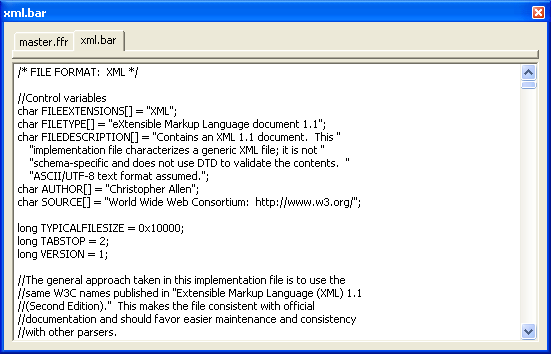 BARfly gives you a plain-text interface for
editing implementation files. This interface will pop up whenever you
open an implementation file from the disk (using File.Open BAR
Implementation File), create a new implementation file (using File.New
BAR Implementation File), or extract an implementation file from a
registry (click the "View" button to the right of the list with the appropriate
I.F. selected in the list).
BARfly gives you a plain-text interface for
editing implementation files. This interface will pop up whenever you
open an implementation file from the disk (using File.Open BAR
Implementation File), create a new implementation file (using File.New
BAR Implementation File), or extract an implementation file from a
registry (click the "View" button to the right of the list with the appropriate
I.F. selected in the list).