|
|
|
|
 Node bookmarks: creation and navigation
 |
|
A node bookmark is a temporarily saved location of a particular node in a data file. In this respect, BAR supports the same concept of a "bookmark" that you will find for other types of software, especially database software. Use node bookmarks any time you wish to create a bookmark and reference it later. Node bookmarks are helpful when you are viewing or editing a very large file. You can locate one node in a "haystack" of complex hierarchical data by navigating to the bookmark instead of sifting through all the branches of the tree control. To create a bookmark, select a node in the node browser and choose Insert.Create Bookmark from the menu, or simply press F4. The log will acknowledge the bookmark creation. You can do this as many times as you wish.
On the left side of the list, each item shows the same line reported in the node browser's tree control for the bookmarked node. On the right side of the list, each item shows the "hierarchy path" of the node. A hierarchy path is an "address" of sorts, composed of a series of relative positions (the result of calling BAR::Get_Relative_Position) for the top-level and each successive child, until the actual node itself is reached (which is the last number). In this example, the selected "RGBQUAD structure" bookmark could reached by calling BAR::Toplevel(), BAR::Child(1), BAR::Child(1) again, and finally, BAR::Child(14). The "bitmapdata block" bookmark two list items below it could be reached by calling BAR::Toplevel() and then BAR::Child(2). Hierarchy paths do not remain constant as you perform node editing tasks. As you insert or delete nodes, some or all of the positions in the hierarchy path automatically change. The act of inserting an RGBQUAD structure before the selection in this case will alter its hierarchy path from "0.1.1.14" to "0.1.1.15." Once you make your selection and click "OK," BARfly immediately updates the node browser selection to your choice of bookmark. If part of the tree containing the node is collapsed, BARfly automatically expands it to show the selection. BAR is careful about handling bookmarks to nodes that are deleted. If a bookmark points to a node, and then either the node itself is deleted or its parent is deleted, the node bookmark is automatically invalidated. This means it will disappear from the dialog box--you can no longer select it as a navigation choice. Other actions that change node data in ways that implicitly require rebuilding
of data, such as accepting a dump-view edit, also have the
effect of invalidating bookmarks. You must keep in mind that node
bookmarks only persist as long as the nodes they reference remain unchanged in
the tree.
See also: [Managing node bookmarks]
|
|
|
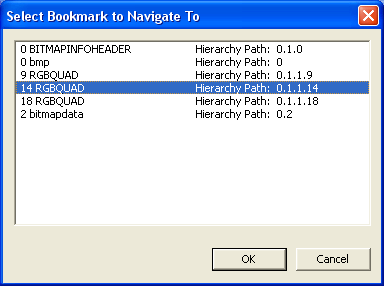 To navigate to a node bookmark you
have created, choose Edit.Navigate to Bookmark from the
menu or press F6. This will bring up the dialog box
shown to the left, which allows you to pick the bookmark to navigate to.
To navigate to a node bookmark you
have created, choose Edit.Navigate to Bookmark from the
menu or press F6. This will bring up the dialog box
shown to the left, which allows you to pick the bookmark to navigate to.