 |
 |
This page describes content of the BARfly
Silver and BARfly Gold builds. |
|
To insert or delete a node, you need to select a line in the node browser,
then select one of the menu items in the Insert menu.
The Insert menu will only let you insert nodes if you had just
focused on a node--if you had been editing something in the data display
window or viewing the log, none of the following features would be available
from the menu.
Node Insertion
You have three mechanisms for inserting a node into the node browser: Insert.Add
Node to End, Insert.Insert Node, and Insert.Insert Node After.
The distinction between these three mechanisms is explained below.
-
Insert.Add Node to End: This inserts a new node as the
last child of the selected node. This means you can only use
this option on organized blocks and bit scan blocks, which are the only types
of node that can have any type of node as a child. You can insert from
the keyboard by pressing Ctrl+E.
-
Insert.Insert Node: This inserts a new node immediately
before the selected node; you can do this to nearly any
location in the tree. You can insert from the keyboard by pressing
Ctrl+I.
-
Insert.Insert Node After: This inserts a new node
immediately after the selected node; you can do this to nearly
any location in the tree. You can insert from the keyboard by pressing
Shift+Ctrl+I.
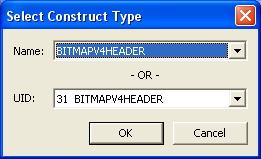 After invoking an insertion command,
the dialog box to the left pops up. This interface lets you select the
construct type (the block or data structure type) of the node you wish to
insert. After invoking an insertion command,
the dialog box to the left pops up. This interface lets you select the
construct type (the block or data structure type) of the node you wish to
insert.
There are two ways you can select the construct. You can choose from the
first combo box, which has the constructs organized alphabetically, or from the
second combo box, which has the constructs organized by unique identifier,
or UID. Unique identifiers are discussed in the
subsection below.
Once you have made your selection, click "OK" and BARfly will attempt to insert
a node at the location you specified. On success, the node browser is
updated with the addition. On failure, the log displays an error message.
BAR imposes the following logical restrictions on insertion contexts:
-
You cannot insert a node before a block's header structure.
Header structures are discussed in the subsection below.
-
Some implementation files use special internal structures that contain pointers.
You cannot insert a structure containing pointers anywhere into the tree.
-
You cannot insert a node if no organized block can serve as a parent to
the inserted block (only happens when the top-level node is an unorganized
block).
-
No insertion is possible if there were not enough node handles
to complete the operation.
-
No insertion is possible if there was not enough memory to
complete the operation.
BARfly attempts to figure out what you had intended to mean when you try to
insert a node at a particular location. The application does so to
prevent these logical restrictions from making your editing tasks more
difficult than necessary. For example, Insert.Add Node to End
will add as the last sibling instead of the last child if the selected node is
not an organized block, Insert.Insert Node will add after the
selection instead of before it as a means of "dodging" header structures,
and Insert.Insert Node After will perform insertions at
child locations rather than sibling locations if the top-level node is
selected.
The number of available node handles and memory
to BARfly can be set by selecting the menu item Options.BAR_Services
Settings. The higher these figures are set, the more
flexibility the user has during the editing process.
A successful insertion operation yields a new block or structure in the node
browser. Please note that Insert.Add Node to End does
not change the selection, allowing you to insert more children repeatedly,
while the other mechanisms immediately change the selection to the inserted
node.
Inserted structures will be set to default values. These
values are determined by the I.F.
Sub-topic: Header Structures
Some organized blocks and bit scan blocks have header structures,
which act as a fundamental attachment to the front of a block when it is
created. Whether a block type has a header structure or not is determined
by how it is declared in the I.F.
A header structure is inextricably linked to its parent block. The block
cannot exist without the header structure, and the header structure cannot
exist without the block. Therefore, you cannot insert anything before the
header structure of a block (it alone can be the first child),
and you cannot delete the header structure without also deleting its parent
block.
The reason for having header structures is simple. It is very common
in binary files for a portion of variable-length data to be preceded by a
fixed-length portion of data, which identifies the type of data, and in many
cases, sizes the variable-length portion of data. The
concept of a "header" is not new, and it is enough of a common practice to
justify making some blocks have header structures guaranteed to exist whenever
the block exists.
If you have inserted an organized block in BARfly whose construct type has a
header structure, the header structure is automatically inserted as the first
child of this block, and initialized to default values.
Sub-topic: Unique Identifiers (UIDs)
Each I.F. has two means of identifying constructs: a unique name,
and a unique 32-bit integer that serves as an identifying
value. This 32-bit number, or unique identifier, is
synonymous with the construct's name when it comes to identification
purposes. It's generally easier to refer to constructs by name than by
UID, so most of the time, you will not concern yourself with UIDs.
However, there are times when you may find it better to refer to UIDs.
Unique identifiers start at 1 and count upwards with each construct that is
defined in the I.F. All implementation files will have six default
UIDs, representing simple types, which are defined as follows.
-
(1) char:
Single-byte integer; can store a one-byte character.
-
(2) short:
Two-byte integer; can store a two-byte character.
-
(3) long:
Four-byte integer; can store a four-byte character.
-
(4) longlong:
Eight-byte integer.
-
(5) float:
Four-byte IEEE 754 single-precision floating point number.
-
(6) double: Eight-byte
IEEE 754 double-precision floating point number.
The remainder of the UIDs (7 and above) will be different for every I.F.
Node Deletion
Node deletion is very straightforward. Select a line to be deleted in the
node browser, and select the Insert.Delete Node or Edit.Delete
menu items. Or, alternatively, simple press the Delete key
on the keyboard.
By default, BARfly asks you to confirm the node deletion. This is
important: accidental node deletion can be data-destructive.
When you delete a node, you lose every piece of data associated with the
node: binary data, text data, and all child nodes, if the node is an
organized block. Deleting a high-level node in the tree has the effect of
deleting every node underneath it permanently, so use this feature with
caution.
BAR imposes the following logical restrictions on deletion contexts:
-
You cannot delete a block's header structure. You can only delete the
header structure by deleting its parent block.
-
You cannot delete the top-level node. A deserialized file always has
a top-level block, and this block cannot be removed--ever.
As long as the file exists, a top-level "container" is always guaranteed to
exist.
See also: [Node editing] [Editing
data in the data display view] [Copying and
pasting data]
|
