BARfly's four windows can be moved, resized, and docked with each other's
corners. There are several rules governing movement, sizing, and docking.
Docking Locations
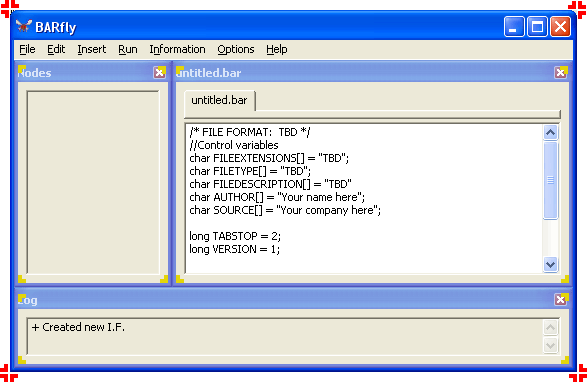
Each of the four windows has several "dockable corners." For all windows,
the user can perform "outside docking" by moving one of the four corners of a
sub-window into one of the receiving slots of the main window. The window
corners are denoted with yellow brackets in the picture to the right, while
valid receiving slots are denoted with red brackets.
There is also the possibility of "inside docking" with the main window's client
area. A sub-window can also be moved into one or more corners of the main
application window's client area (extending the width of the window, and
extending from just below its menu to the bottom of the window). The
default window configuration docks all sub-windows inside the main window's
client area.
It is also possible to incidentally dock sub-windows with each other. For
example, the default configuration automatically docks the node browser and
data display windows horizontally, and the log vertically with both the node
browser and data display windows.
Moving Windows
When moving a sub-window, only the sub-window is moved--nothing else moves with
it. Select a new location for the window, which may or may not be docked
with another window's corner.
When moving the main window, all docked sub-windows are moved with it, whether
docked on the inside or outside.
Resizing Windows
When resizing a sub-window, one of the following things can occur if another
sub-window is docked with this sub-window:
-
If other sub-window is free-floating or docked to the outside of the
main window, the other sub-window is moved
to keep its corner flush with the sub-window being resized.
-
If other sub-window is also docked to the inside of the main window's
client area, the other sub-window is resized
to keep its corner flush with the sub-window being resized.
-
The main window is never moved or resized if docked with a sub-window at the
time the sub-window is resized.
When resizing the main window, the following things happen to sub-windows if
they are docked:
-
If a sub-window is docked to the outside of the main window, the
sub-window is moved
to keep its corner flush with the main window.
-
If a sub-window is docked to the inside of the main window's client
area, the sub-window is resized and positioned in such a fashion that
the relative position and ratio of the sub-window's sizes before the
resize operation are preserved. The resulting sub-window's new
dimensions are such that the previously docked corners remain docked, but the
dimensions might be larger or smaller, depending on whether the main window was
grown or shrunk in size.
Resetting Windows
In case the user has gotten a bit too "creative" in manipulating windows, to the
point where they might no longer be visible on-screen, the user can reset the
window positions to their default configuration by selecting Options.Reset
Window Positions.
See also: [The BARfly Menu] [The
BARfly Windows]
|
