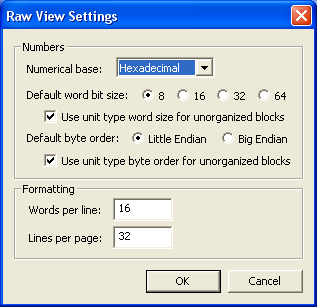
 Select Options.Raw View
to bring up the dialog box to the left. From this dialog, you can modify
raw view settings. You can configure the individual numbers (words)
displayed in raw view as well as the dimensions of the grid shown in the view. Select Options.Raw View
to bring up the dialog box to the left. From this dialog, you can modify
raw view settings. You can configure the individual numbers (words)
displayed in raw view as well as the dimensions of the grid shown in the view.
The number of words per line is only a suggestion to
BARfly. Raw view is limited by the physical width of the data display
window. If the data display window is too small to
accommodate the suggested number of words per line, BARfly automatically
shrinks this value to a word count that can be displayed comfortably on the
screen without overlap of data.
The number of lines per page is allowed to exceed the physical
height of the data display window. In this respect, you can force page
boundaries to reach further than what you can see in the entire window.
However, it is recommended that you keep the number of lines per page at a
value commensurate with the window height, as some lines can never be seen if
the lines per page count is too high.
-
Numerical base: Choose between decimal,
hexadecimal, octal, and binary. Please
keep in mind that the numerical base directly impacts how many words can fit on
each line; smaller bases will require more characters per word.
-
Default word bit size: Choose between 8,
16, 32, and 64.
Byte size is bit size divided by four: 8 == 1 byte (char type), 16 == 2
bytes (short type), 32 == 4 bytes (long type), and 64 == 8 bytes (longlong
type).
-
Use unit type word size for unorganized blocks: If
checked, the unit type bit size for unorganized blocks displayed in raw view
overrides the default word bit size. If unchecked, the default word size
is always used, regardless of node type.
-
Default byte order: Choose between little endian
and big endian. This byte order is used when
interpreting multi-byte words in raw view. The setting only impacts word
bit sizes 16, 32, and 64; it does not affect size 8.
-
Use unit type byte order for unorganized blocks: If
checked, the unit type byte order for unorganized blocks displayed in raw view
overrides the default byte order. If unchecked, the default byte order is
always used, regardless of node type.
See also: [Data file load settings]
[Data file save settings] [Settings
for loading and saving BAR implementation files]
[Node editing settings] [Tree
control line info settings] [Subnode view
settings]
[Dump view settings] [Text
view settings] [Raw view settings]
[Memory and BAR_Services settings] [Message
display settings] [Toggling tool windows]
|
