|
|
||||||
|
|
||||||
 Adding and removing BAR I.F.s
 |
||||||
|
The "Add" and "Remove" buttons are by far the easiest means of registering and unregistering implementation files. For registration, you click the "Add" button and a dialog box pops up, which allows you to select an I.F. from the disk to register. For unregistration, you click the "Remove" button, and the selected I.F. line in the list is permanently removed from the registry. If you want to explicitly register an already-open I.F., switch to its tab in BARfly, and then choose Insert.Register Format from the menu (or use keyboard shortcut Ctrl+R). You will be prompted for which open registry you want to add the I.F. to (because there might be more than one open). An I.F. dependent on a particular registry is a special case: it will not prompt you which registry to pick, since it already knows. You can also unregister an I.F. dependent on a registry by choosing Insert.Unregister Format from the menu (or use keyboard shortcut Ctrl+U). This breaks the dependency; the I.F. will need to be saved to the disk to prevent data loss. The menu item Insert.Unregister Format is not useful for
stand-alone implementation files loaded from the disk directly. Special dependency considerations When an I.F. is registered from a stand-alone implementation file, no dependency is established. Closing the registry will not subsequently subject the I.F. to dependency-based automatic closure. When a dependent I.F. is opened for viewing or editing, and it is subsequently unregistered, the I.F. and any data files associated with the I.F. are closed automatically.
See also: [About BAR registries] [Creating/Opening registries]
|
||||||
|
|
||||||


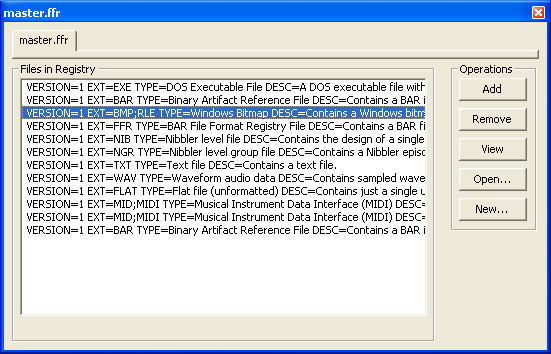 There are two ways to add an I.F. to a
registry or remove an I.F. from a registry. The first mechanism is
to use the "Add" and "Remove" buttons located to the right of
the list in the open registry itself. The other mechanism is to
explicitly register or unregister an I.F. from the Insert menu
when the I.F. view is displayed.
There are two ways to add an I.F. to a
registry or remove an I.F. from a registry. The first mechanism is
to use the "Add" and "Remove" buttons located to the right of
the list in the open registry itself. The other mechanism is to
explicitly register or unregister an I.F. from the Insert menu
when the I.F. view is displayed.