|
|
|
|
 Dump
View Dump
View |
|
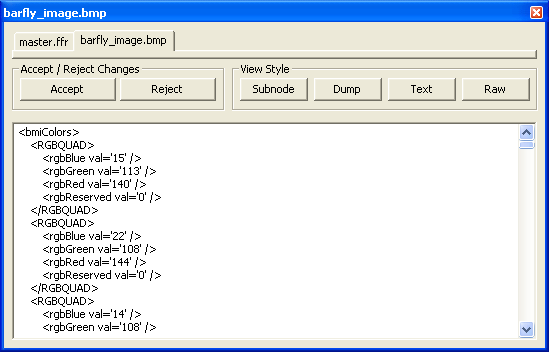
In the example to the left, XML is used to dump an organized block, called "bmiColors." This organized block has several child "RGBQUAD" data structures, which are displayed as sub-elements of the top-level "bmiColors" element. Each "RGBQUAD" data structure in turn has four data members, which are shown as empty elements with XML attributes identifying the individual value of each variable. Dump view is the most versatile of the views you can use to display and edit node data. You can dump any node, regardless of type. Data structures, unorganized blocks, and organized blocks all work equally well in dump view. It is a trivial matter to copy dumped data to and from the edit control.
In this respect, you can port dumped data to and from other applications in a
manner which, before BARfly, was not even remotely possible! Regardless of whether UTD or XML is used in dump view, the naming conventions for the dumped content are always consistent. The I.F. determines which construct and variable names can be used in the dump. When anti-dump is performed, the names must match those defined in the I.F. for modified data to be accepted. Important note about XML dumped content in BARfly: element names are case-sensitive. This is necessary because BAR is a case-sensitive protocol. Unorganized blocks and data structures are implicitly dumped when they are selected in the node browser, if options were set to allow for default dump view for that node type. Organized blocks are not implicitly dumped; you must click on the "Dump" view style button explicitly each time you want to dump an organized block's contents. The reason for this rule is that dumped data content size can grow very high for large blocks, which means the amount of time necessary to synthesize the dumped data can get fairly long. The user must explicitly "commit" to this time for blocks of such considerable size. There are quite a lot of options you can set for how BARfly dumps node data. However, you don't need to stick hard and fast to these format settings if you are editing the dumped content. You have a great deal of flexibility in how you construct your own "replacement data." Click here for information about changing dump view settings. Click here for information about editing in dump view.
See also:
|
|
|
 Dump View dumps
node data in plain text, and displays this text in an edit control for you to
use. You can dump the data in either UTD or XML
format.
Dump View dumps
node data in plain text, and displays this text in an edit control for you to
use. You can dump the data in either UTD or XML
format.