|
|
|
|
 Raw
View Raw
View |
|
Veteran programmers will be familiar with this type of interface, and will use this view a lot. Non-programmers might not want to touch this view with a ten-foot pole. "Hex editors," as they are commonly known, are not by their nature easy to use; this view is for advanced users only. In the example to the left, a BMP file has a portion of its image pixel data displayed in raw view. The data are nonsensical to most people because the view shows image pixels as they are represented in the file. No attempt is made to translate the data into something meaningful, as the data are displayed "raw" in this view in every sense of the word. You can display raw view for any node, but you will be asked for
confirmation if you try to display raw data for an organized block.
This is because BAR has isolated data into their own nodes, and by
viewing all the organized block children at once in raw form, you're ignoring
the boundaries between individual nodes. If you are not careful, this
view can result in accidental data destruction that is difficult to undo. Raw view displays binary data as a series of "words." A "word" in this sense is a fixed-length unit of data, between 1 and 8 bytes in length, that is represented as both an unsigned integer and one or more characters in the view. You use the mouse and keyboard to select the raw view cursor, which is an inverted-color block over the word being focused on. Each line of data is preceded by a byte offset, which counts up from zero. The byte offset is always in the same numerical base as the words displayed on the line. Use the arrow keys to move the raw cursor. You can also use Page Up and Page Down to scroll through an entire page of words at once. The Home and End keys scroll the view to the start and end of the node data, respectively. To switch between the integer side (left) and the character side (right), use the Tab key, or simply select the appropriate area with the mouse. The area of focus will be shown with an inverted-color block, while the equivalent word on the unfocused area will be shown with an underscore. There are many options you can set for raw view, including the word size, the word byte order (big endian or little endian), the numerical base used for the integers, the number of words per line of data, and the number of lines per page of data. These settings can help to make sense of the raw data if a user has a good idea of what the data represent, but does not wish to perform some of the more tedious manual interpretations of words that are often necessary for individuals that use hex editors. Click here for information about changing raw view settings. Click here for information about editing in raw view.
See also:
|
|
|
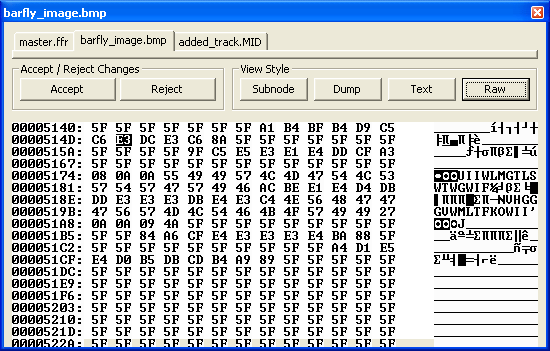 Raw View provides
the classic binary editing interface, with a split view (numbers on the left
side and ASCII characters on the right side).
Raw View provides
the classic binary editing interface, with a split view (numbers on the left
side and ASCII characters on the right side).